
Docs
Make games with Pixelfork
Everything you need, from your first game to Google Play. Short, and in plain words.
Welcome
Pixelfork is an AI game maker. You describe a game in plain words, and Pixelfork designs it, writes the code, tests it in a real browser and hands it back playable in a few minutes. Then you shape it by chatting, the way you'd ask a friend.
These docs walk through everything, from your first game to putting it on Google Play.
Create your account
Press Start building and enter your email; we send you a link that signs you in. No password needed. You can also continue with Google.
The first time, Pixelfork asks what to call you. The name shows on games you publish, and you can skip it.
If you typed an idea on the home page first, it's waiting for you on My games, ready to build.
The sign-in link works once and expires after an hour. Didn't get it? Check spam, or ask for a new one after 30 seconds.
Your first game
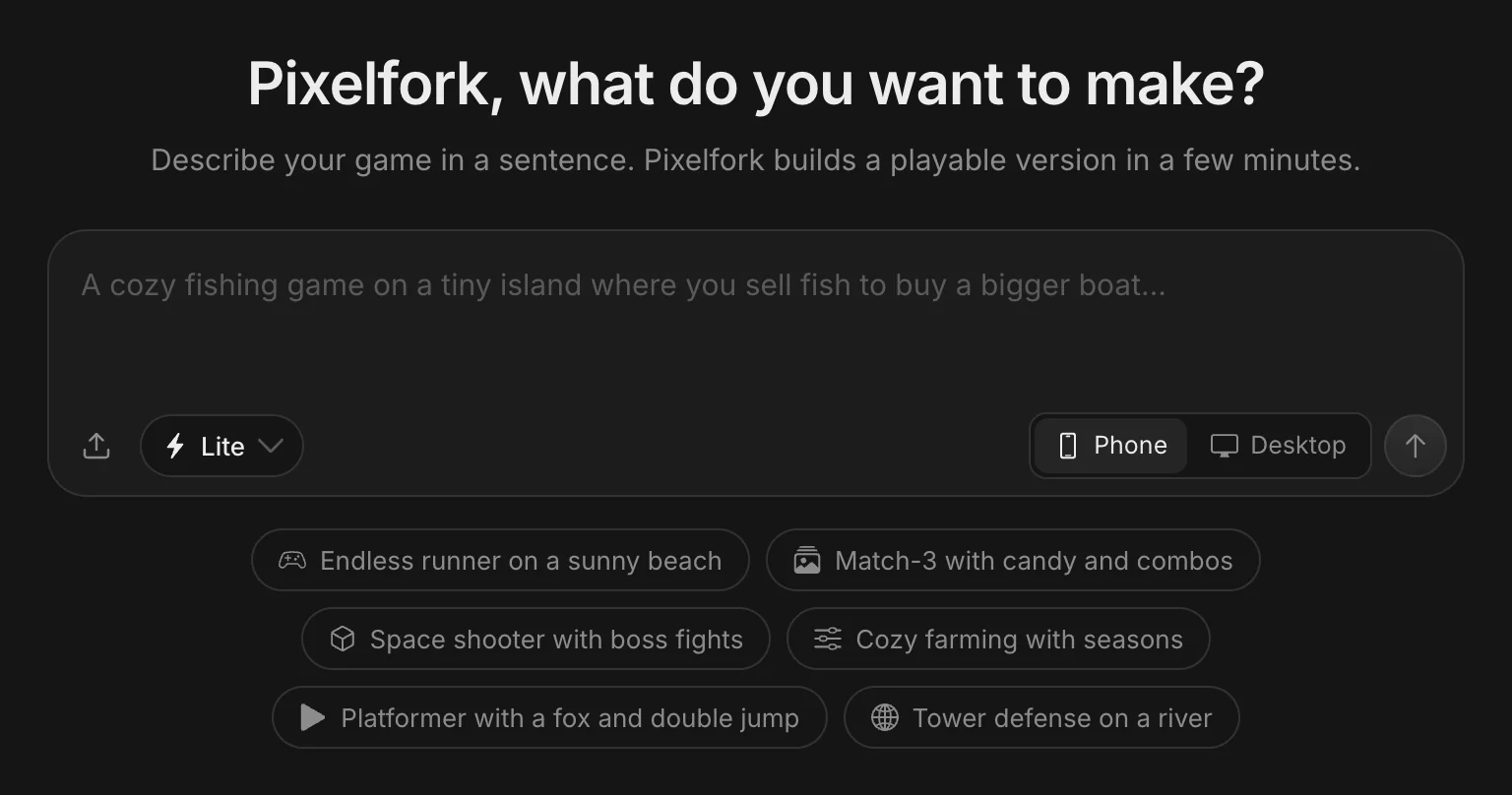
On My games, describe the game you want in the box at the top.
From an idea to a playable game. The build is sped up: it took about 2 minutes.
 123456
- Describe your game here, in any language.
- Add your own files: pictures, sounds, 3D models, fonts.
- Lite draws the art in code; Balanced paints real art for it (Lite and Pro).
- Phone or Desktop: what the game is made for.
- Create game: Pixelfork starts building.
- Not sure what to make? Tap an idea to start from it.
- Describe it. Say what the player does, how they win or lose, and how it should look. A few sentences is plenty.
- Pick Phone or Desktop. Phone makes an upright game played by touch; Desktop makes a wide window with keyboard and mouse.
- Add your files, if you like. Attach a character picture, a jump sound or a 3D model, and Pixelfork uses them in the first build.
- Send. Pixelfork designs the game, writes the code, tests it in a real browser and fixes what it finds. It takes a few minutes; you can watch each step.
When it's ready, version 1 plays in the preview. Pixelfork starts with a small, fun core you can play right away, then you grow it by chatting.
Good requests are specific: “A cozy fishing game on a tiny island where you sell fish to buy a bigger boat” gets a better first game than “a fishing game”.
Find your way around
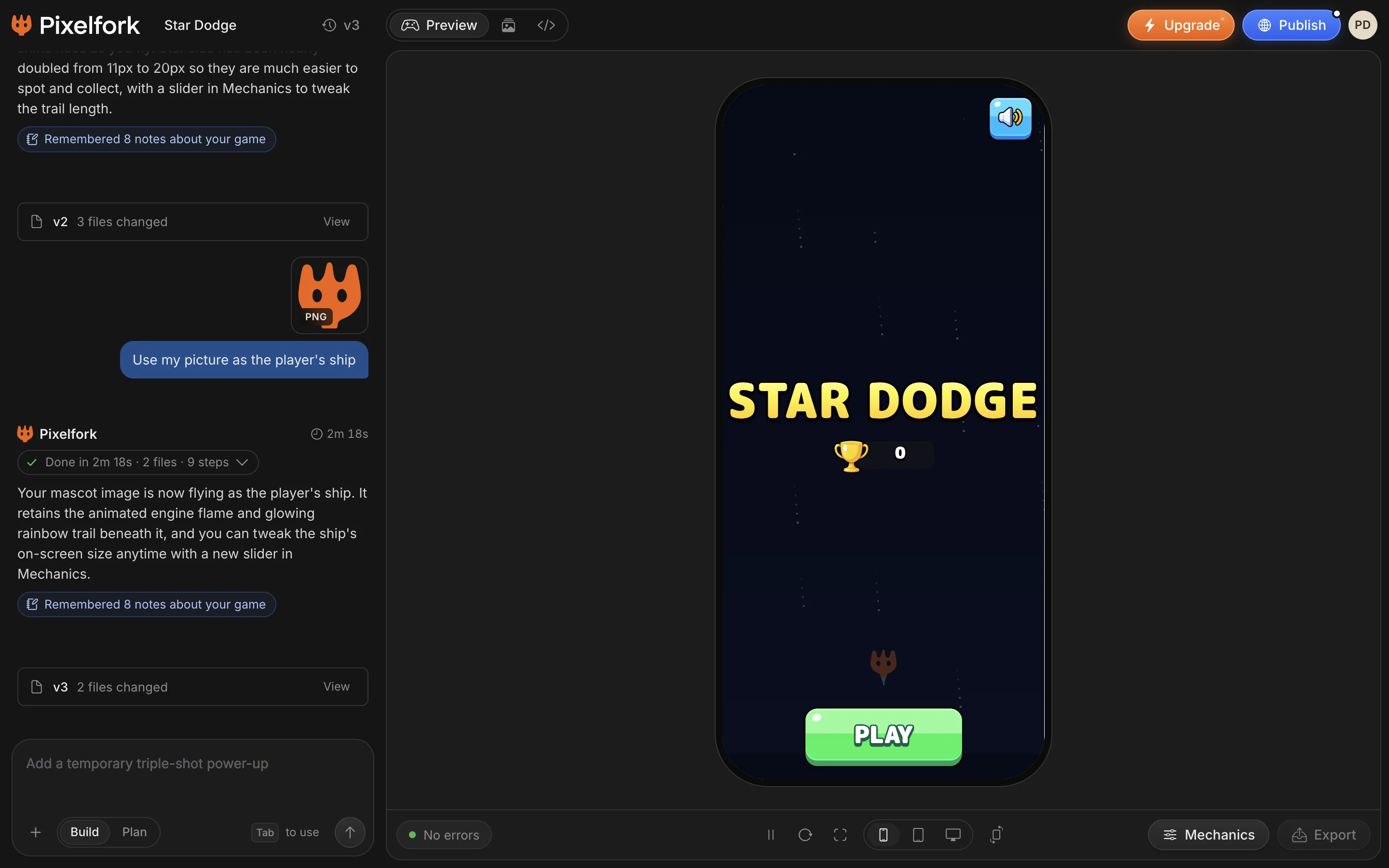
Every game opens on its game page: the chat on the left, your game on the right.
 123456789
- Each change becomes a version you can open.
- The chat box: ask for changes here.
- Versions: the latest ones, and the full history.
- Preview, Assets and Code.
- Publish: a link anyone can play.
- Your game, running. Play it right here.
- The Console: errors and messages from your game.
- See it as a phone, a tablet or a computer.
- Mechanics: change values while it runs.
Change it by chatting
Ask for changes in the chat, in any language: “make the balls heavier”, “add a boss at 1,000 points”, “use my picture for the player”. Pixelfork shows its work step by step and asks when it needs your call.
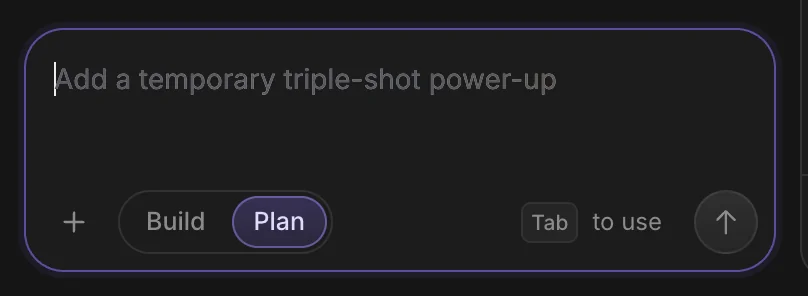
Build changes the game. Plan talks an idea through first without changing anything, so you can agree on the approach before spending credits on it.
You can keep typing while Pixelfork works: new messages wait their turn.
Asking for a rainbow trail and bigger stars. The change is sped up: it took about a minute.
 1234
1234- Build: Pixelfork changes the game.
- Plan: talk it through first. Nothing in your game changes.
- Add files, pick from your assets, send a screenshot of the game, or generate an image.
- Pixelfork suggests a next step in the empty box. Press Tab to use it.
Versions
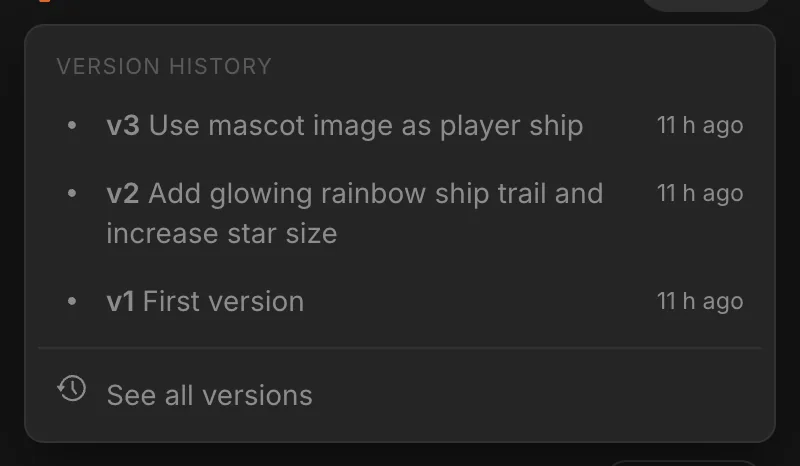
Every change is a new version, so nothing is ever lost. Open the versions menu to see the latest ones, or See all versions for the full history by day, with a picture of the game and what changed.
Open any version in the preview, Restore it (it's added as a new version, so your newer work stays), or give it a name to find it later. Restoring never uses credits.
 12
12- The latest versions, newest first.
- See all versions opens the full history.
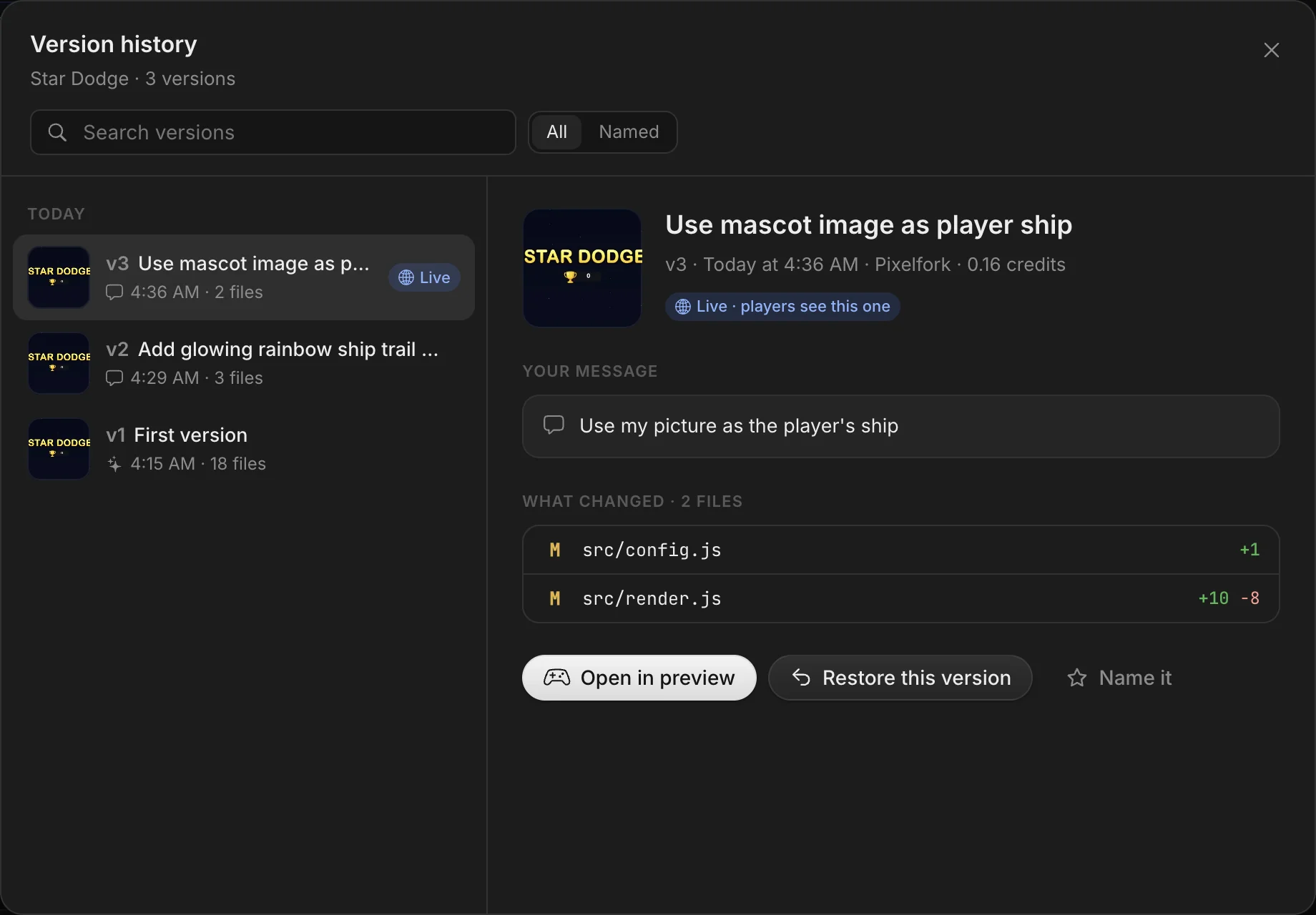 12345
12345- Search your versions.
- Every version, by day, with a picture of the game.
- What changed: the files and lines.
- Restore this version. It comes back as a new version.
- Name it, to find it later.
Game notes
Game notes are what Pixelfork remembers about your game: the rules it must keep (“the player never has more than three lives”) and notes about how the game works.
Pixelfork updates them after each change. You can add and edit them too; what you write stays exactly as you wrote it, through every change.
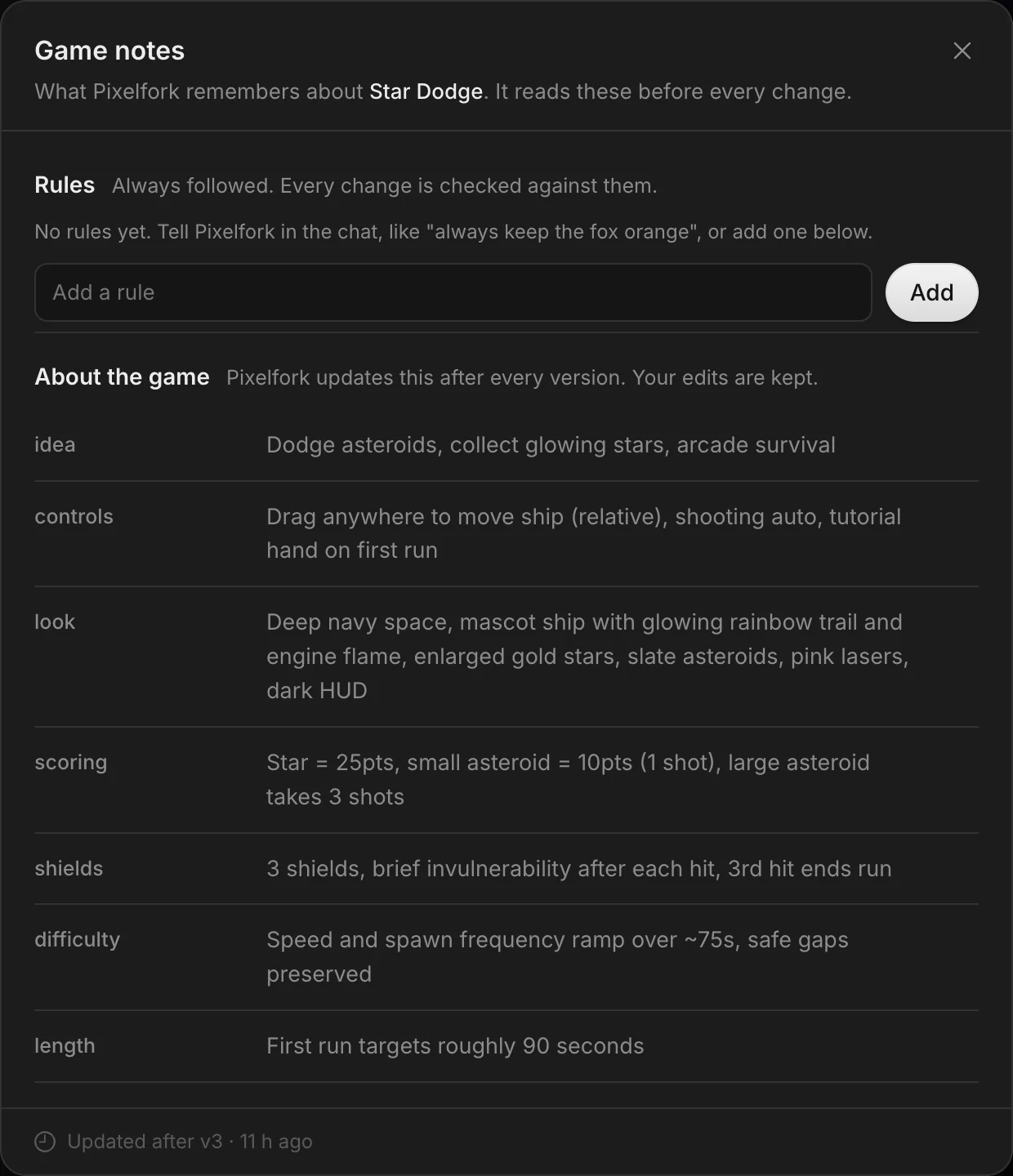 12
12- Rules: add your own, like “the player never has more than three lives”.
- About the game: what Pixelfork knows, updated after every change. Your edits are kept.
Mechanics
Mechanics turns every important value in your game into a slider: speed, gravity, lives, colors and more. Change them while the game runs and save when it feels right. Mechanics never uses credits.
Dragging the asteroid Size and the ship's Trail length while the game runs.
Your art, sounds and models
Drop files into the chat or open Assets, then ask Pixelfork to use them. It measures each file (a picture's size, a sound's length, a 3D model's animations) and wires it in.
Adding a picture from the + menu and asking Pixelfork to use it as the player's ship. The change is sped up.
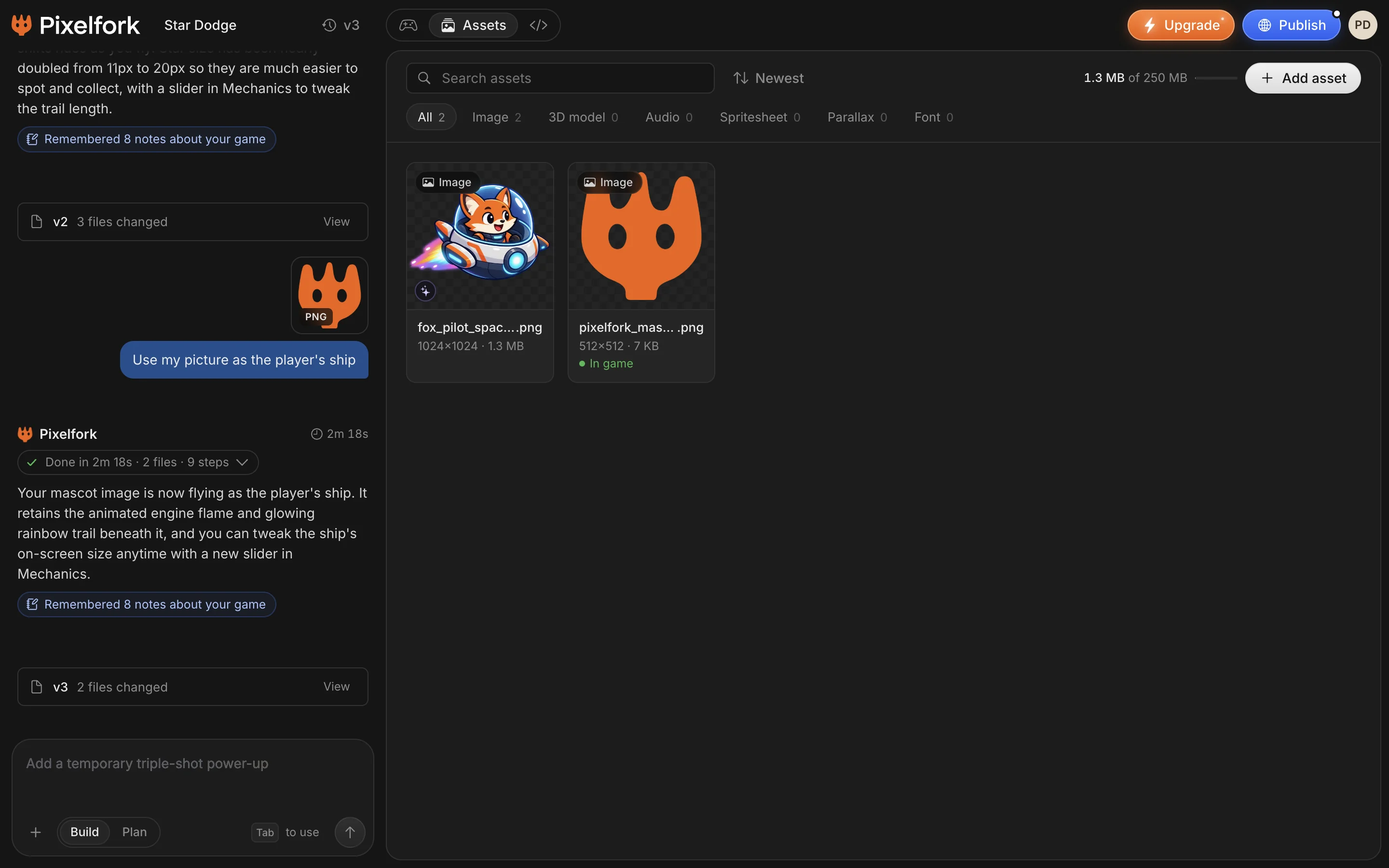 123
123- Add asset: upload a file, or generate one.
- Filter by type: images, 3D models, audio, spritesheets, parallax, fonts.
- In game: this file is used in your game.
- Images: PNG, JPG, WebP, GIF, SVG, including spritesheets and parallax backgrounds
- Sounds: MP3, WAV, OGG, M4A
- 3D models: GLB and glTF, with their animations
- Fonts: TTF, OTF, WOFF
- Video: MP4, WebM, MOV
Free: files up to 2 MB and 10 MB per game. Lite: 50 MB files and 100 MB per game. Pro: 50 MB files and 250 MB per game.
Generate image
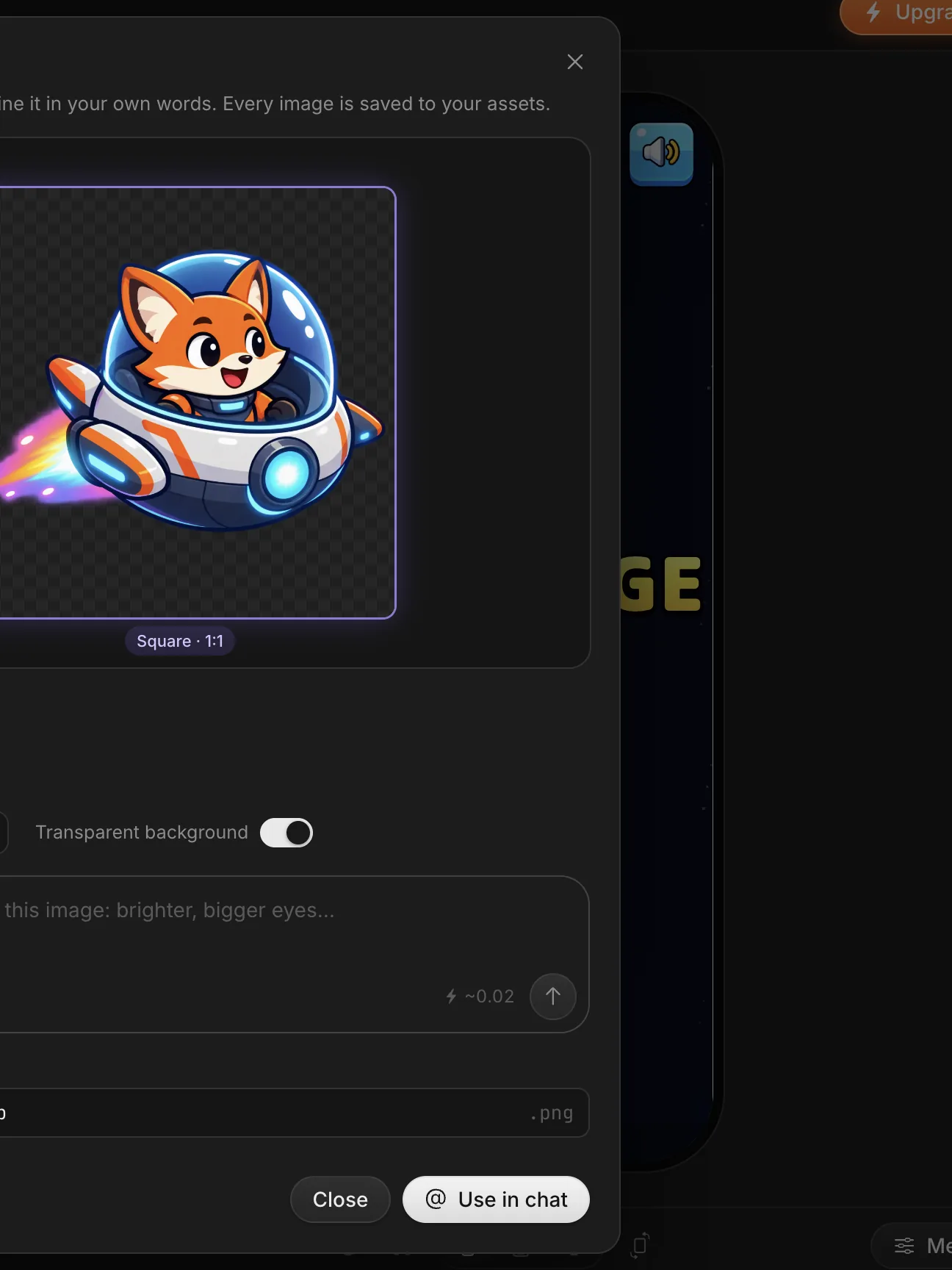
Need art? Press Generate image, describe what you want, and Pixelfork makes it for your game. You can give it reference pictures to match a style. Generated images are yours to use.
Pick Square, Wide or Tall, and a transparent background for characters and objects. Then refine it in your own words, or use it in the chat.
Painted art
On every plan, a new 2D game can be painted with real art instead of drawn in code. Pixelfork paints a look for your game first: build it, try another look, or ask for a change in words. Then it paints each character with its moves, the pieces and the backgrounds.
Code and the Console
Every game is plain HTML5 and JavaScript. On Lite and Pro, the Code tab lets you open and edit your game's files; saving checks the game and makes a new version.
The Console in the preview bar shows errors and warnings from your game, with their file and line. Fix with AI fixes an error in one click, free when the error is Pixelfork's own.
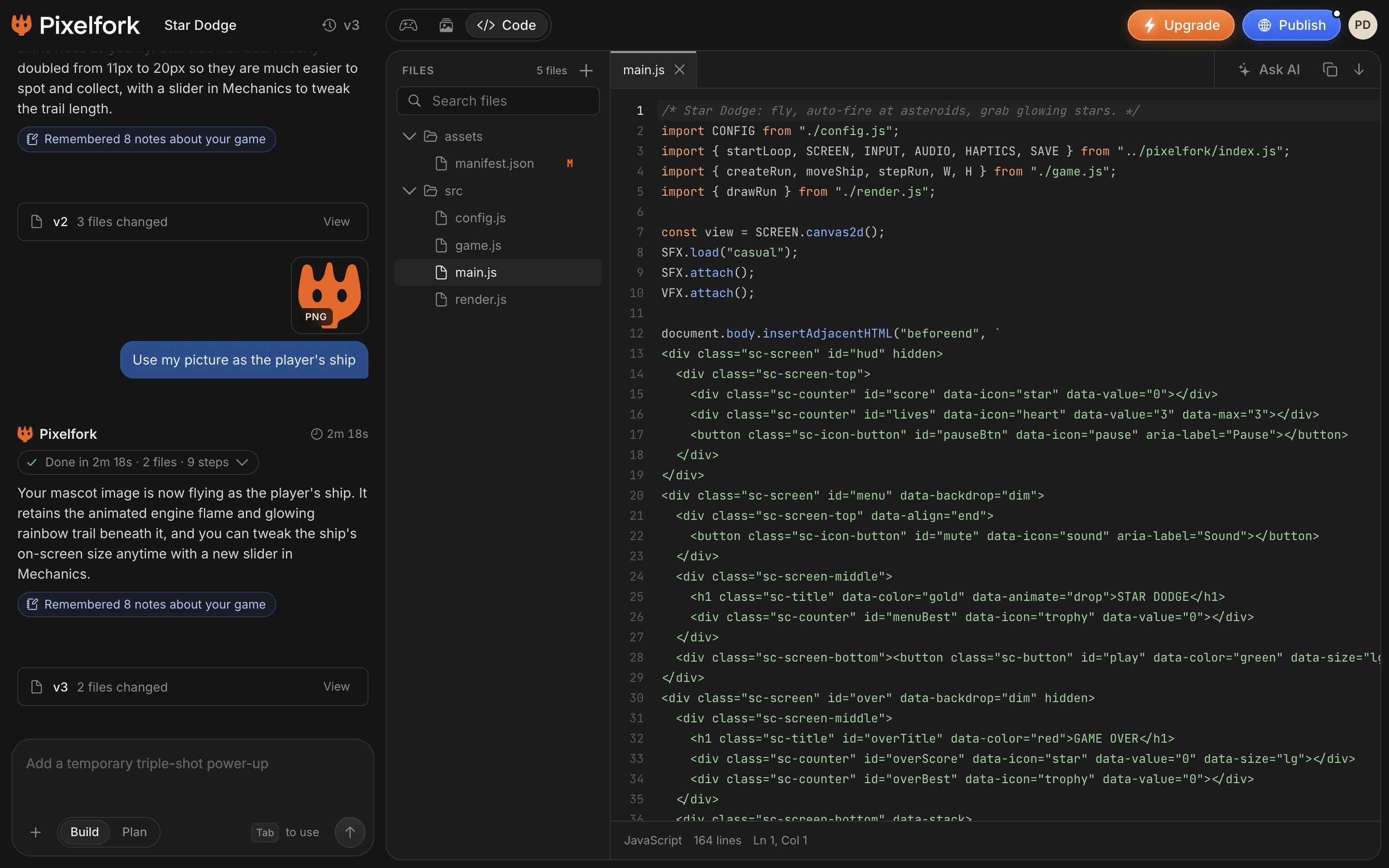 1234
1234- Search your game's files.
- Files this version changed are marked M.
- The editor. Save as a version when you're done.
- Ask AI about the code.
Publish and share
Press Publish in the top bar. Give your game a name, a description and a thumbnail, and you get a link anyone can play, with no account, plus a QR code for phones.
Players keep seeing the published version until you press Update, so you can keep working without breaking it. You can change the link's name or unpublish at any time.
Games are Public by default. On Lite and Pro you can make one Private: only people with the link can open it, and search engines are asked not to show it.
Publishing a game as Private, then opening the QR code.
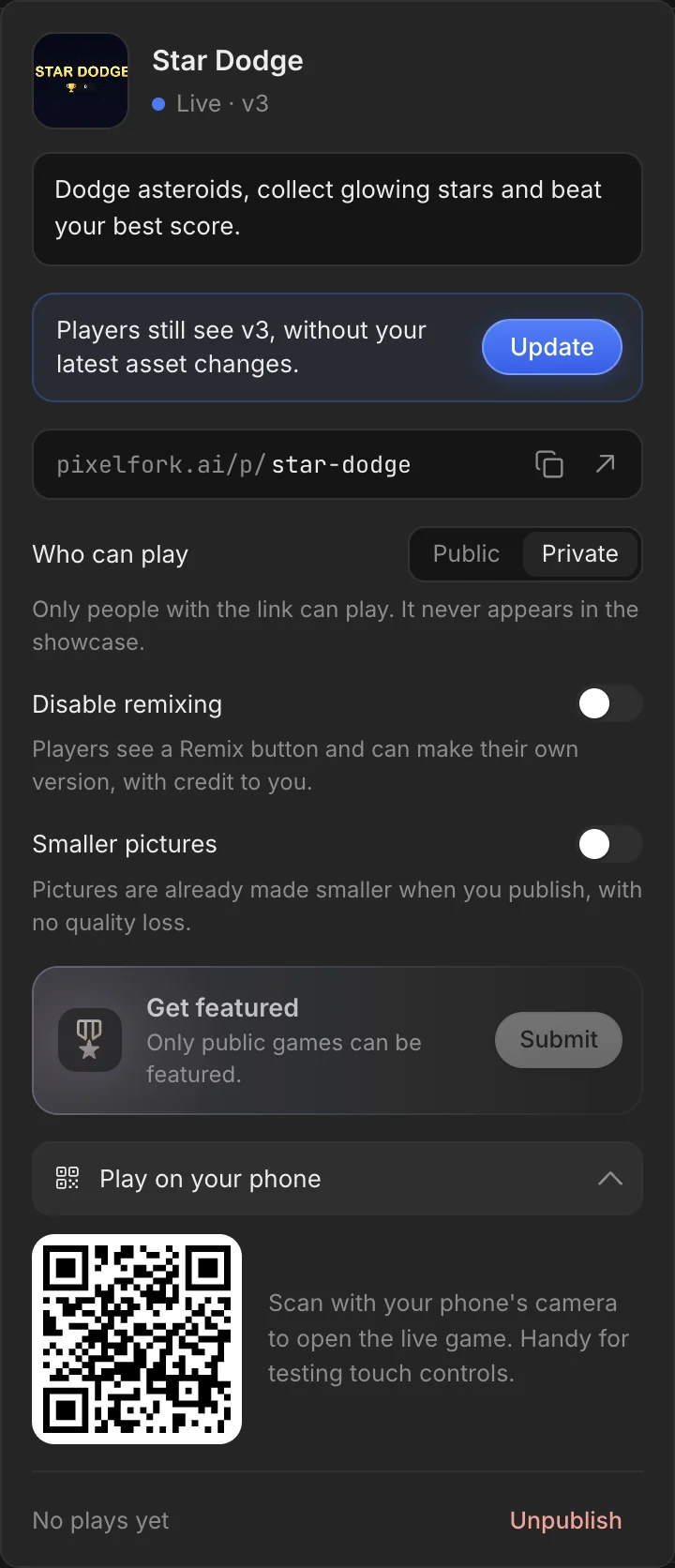 12345
12345- Your game's link. Copy it or open it.
- Public or Private.
- Remixing: on unless you turn it off.
- Play on your phone: scan the QR code.
- Unpublish at any time.
Remix a game
Found a game you like? Open the menu at the top of its page and press Remix this game to get your own copy of the published version, with its art and files, but not its chat. It costs no credits, and your copy shows who it came from.
Your own published games can be remixed too. Remixing is on by default; on Lite and Pro you can turn it off in Publish. Copies made before you turn it off stay.
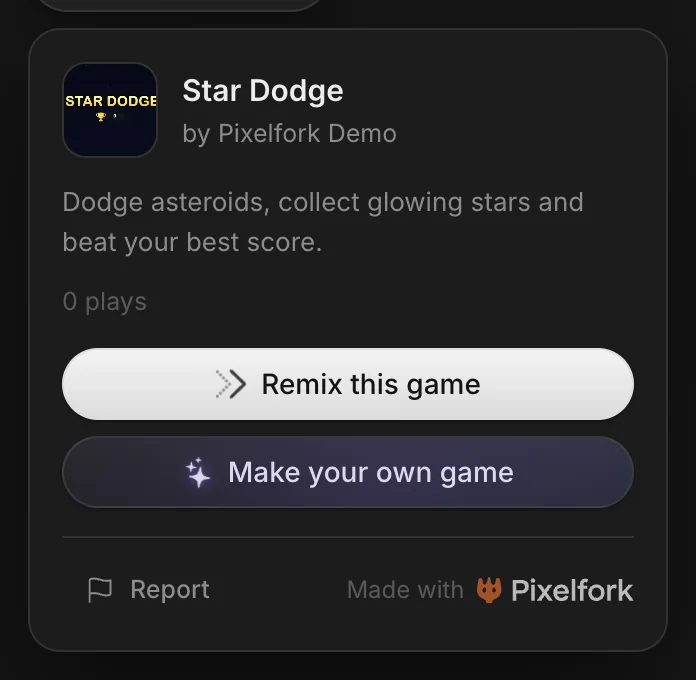 123
123- Remix this game: your own copy to change.
- Make your own game from scratch.
- Report a game that breaks the rules.
Export for Android
Open Export in the preview bar to take your game to Android:
- APK: install it on your phone to test
- AAB: upload it to the Google Play Console to publish your game
- Android Studio project: open it and customize the app
- Project ZIP: the whole game, for any web server
APK is on every plan; AAB, the Android Studio project and the ZIP are Lite and Pro. Exports never use credits. Pixelfork keeps each game's signing key, so updates to your app on Google Play are signed the same way.
On iPhone, your games play in Safari. There's no App Store export yet.
Credits and plans
Credits pay for the AI's work. A new game uses more than a small change. Any request needs at least 35 credits to start: Pixelfork sets aside what it might need, up to what you have, and charges only what it used. If a build fails, the credits come back.
Free, Lite and Pro come with 300, 1,500 and 2,800 credits a month. Monthly credits are topped up each month and don't roll over; add-on credits never expire.
These never use credits:
Help and feedback
Something not right, or an idea? Open the account menu and choose Send feedback; you can add a picture. For quick help, join our Discord, or email dev@pixelfork.ai.
Your first game is one sentence away. It's free to start.